Run the code. Read the answer.
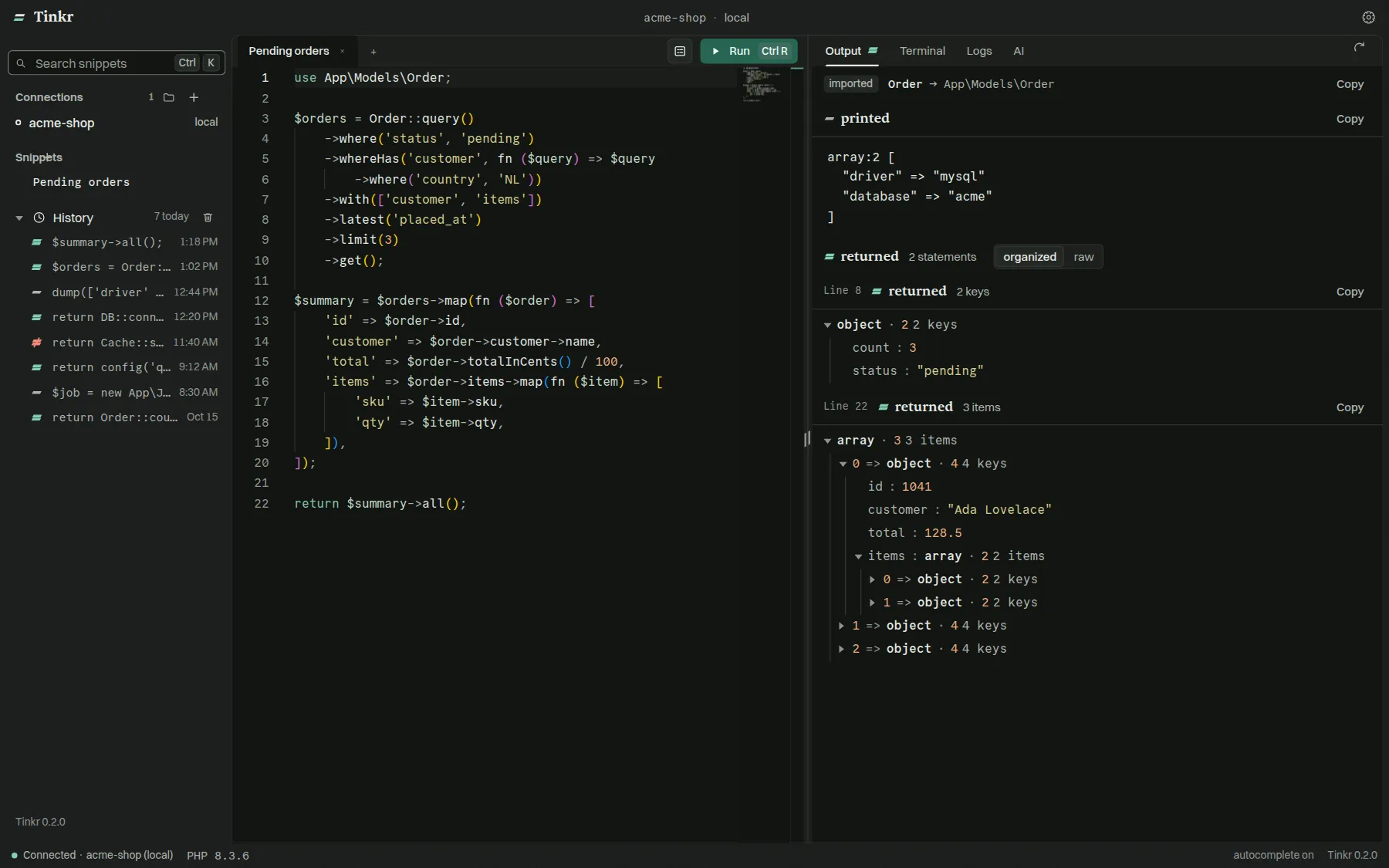
A desktop app for Laravel Tinker and plain PHP. Run a snippet in any project, on this machine, in a container or over SSH, and get back the value it returned, not a wall of text it printed.
use App\Models\Order;

return Order::query()
    ->where('status', 'pending')
    ->with('customer')
    ->latest('placed_at')
    ->limit(3)
    ->get()
    ->map(fn ($order) => [
        'id' => $order->id,
        'customer' => $order->customer->name,
        'total' => $order->total_in_cents / 100,
    ]);
dump(config('database.connections.mysql.database'));

echo DB::connection()->getDriverName();
Collection · 3 items
0 => array · 3 keys
1 => array · 3 keys
2 => array · 3 keys
select * from `orders` where `status` = ? order by `placed_at` desc limit 3select * from `customers` where `customers`.`id` in (?, ?, ?)"acme"
mysql This run sent no queries.
Order::query()->where(… dump(config('database.connec… php artisan tinker is the fastest way to ask your app a question, and the worst way to read
the answer.
- returned
Values, not text.
A collection comes back as a table, a model as a tree, HTML as a rendered frame.
Collection → table · 3 rows
- returned
See what it cost.
Every query the run sent, with its bindings, its time and its connection.
select * from orders … 1.24 ms
- returned
Touch production without fear.
Run a write inside a transaction, look at what changed, then keep it or take it back.
rolled back · 3 rows held
- returned
Always fresh.
Each run boots a new Tinker session, so the code on disk is the code that runs.
new session · per run
Run.
Wherever the project lives.
- Connections
- Local projects, containers, servers over SSH with a key or a password, a container on a server, and Laravel Cloud environments. Tag a connection as production and Tinkr asks before a run writes to it.
- php artisan tinker · docker exec · sail · kubectl exec · ssh · laravel cloud
- An editor that knows your project
- Monaco, with class names and
::method suggestions read from your own code, locally and over SSH. - Snippet forms
- Turn a snippet's variables into a form and run it like a tiny admin panel.
- Snippets and history
- Save the code you reuse. Every run is kept across restarts, and one click puts it back in the editor.
- the last 50 runs of every connection
Read.
The value, not the noise.
- Readings
- The returned value as a tree, a table, a graph or rendered markup, next to the raw output. Copy any table or save it as CSV.
- Queries
- Every SQL statement the run sent, with its bindings, its duration and the connection it went to.
- Dry run
- Run inside a transaction you keep or take back, or in a sandbox where mail, jobs, HTTP calls, file writes, the cache and the log are recorded instead of happening.
- Stop
- A run that is going can be stopped, and the PHP behind it really stops, in a container or on a server.
- Log viewer
- Your app's logs in a window of their own. Filter by the eight monolog levels, by a term and by a span of time, or follow a file live.
- storage/logs/laravel.log
Ask.
Bring your own model.
- AI completions
- Complete snippets with OpenAI, Claude, Ollama, OpenRouter, OpenCode Zen and Go, or an endpoint of your own.
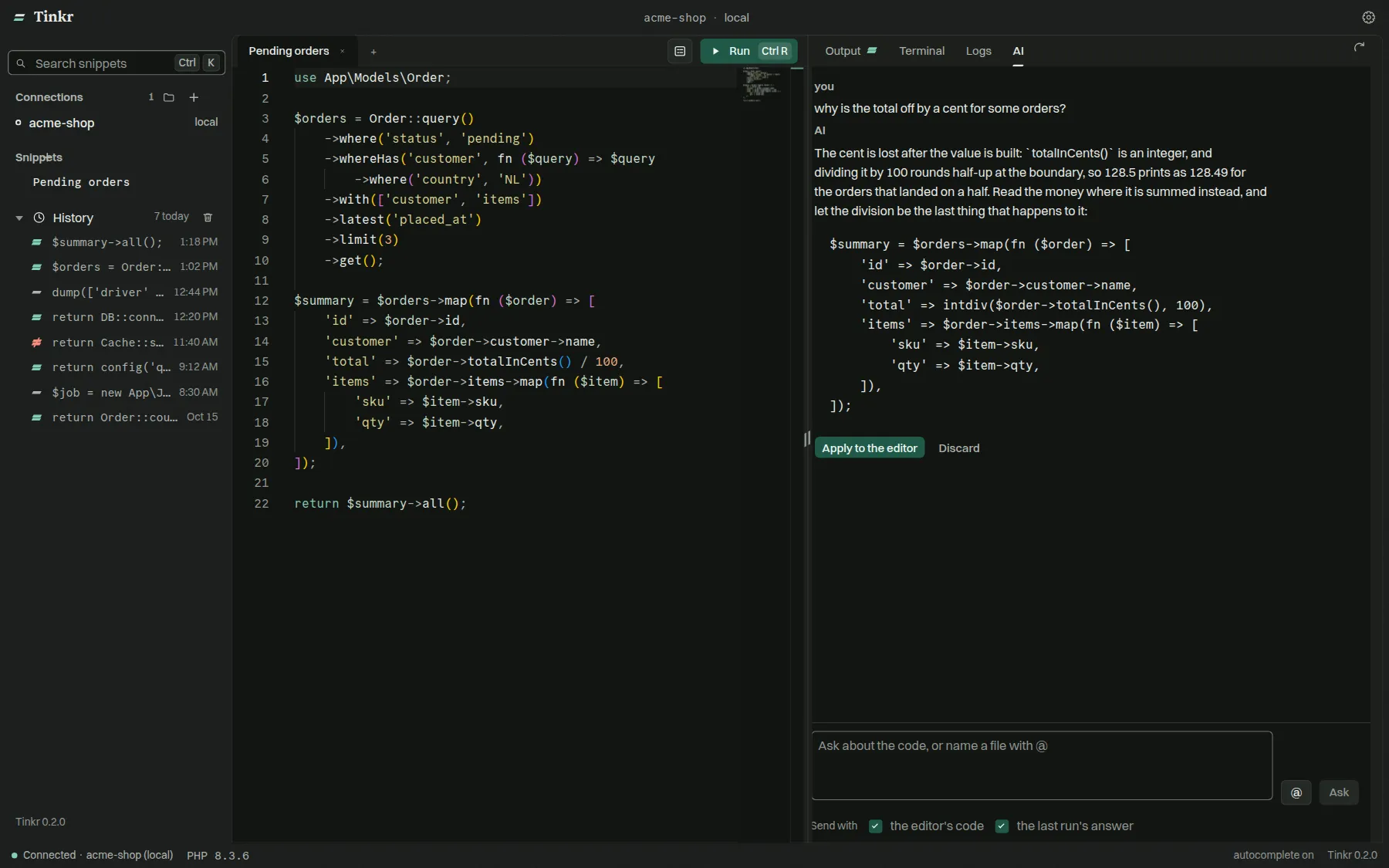
- AI panel
- Ask about the code in front of you. The last result goes along, @ pulls in project files, and proposed code drops into the editor.
- MCP server
- Let Claude Code, Cursor, VS Code and other MCP clients run PHP through the same connections you use.
- How the MCP server works
Try a write on production. Keep it, or take it back.
A plain run does what the code says. A rollback run holds the database in a transaction. A sandbox run holds the database and records everything else the code tried to do.
| Side effect | Plain run | Rollback | Sandbox |
|---|---|---|---|
| Database writes | happens | taken back | taken back |
| happens | happens | recorded | |
| Queued jobs and events | happens | happens | recorded |
| HTTP calls | happens | happens | recorded |
| Files on Laravel disks | happens | happens | recorded |
| Cache | happens | happens | recorded |
| Log entries | happens | happens | recorded |
A sandbox holds what Laravel routes through its own drivers. A shell command, a raw socket or a file written outside Laravel's disks is not held, and Tinkr says so.
Your agent runs PHP the way you do.
Tinkr ships a Model Context Protocol server. Claude Code, Cursor, VS Code and friends run code in your project's own Tinker session, locally or over SSH, and get the returned value back as data.
{
  "mcpServers": {
    "tinkr": {
      "command": "node",
      "args": ["/path/to/tinkr/packages/tinkr-mcp/src/cli.js"]
    }
  }
}
Or open Settings → MCP in the app, pick your client, and Tinkr writes this for you.
Questions people ask
Is Tinkr free?
Yes. Tinkr is free and open source under the MIT license. The code is on GitHub, and every release is built from it.
Do I need Laravel?
No. Laravel projects run in Tinker. Any other PHP project runs in the session command you give its connection, such as PsySH. You need php on the machine or server where the project lives, and nothing else.
Does it work with Docker, Sail or Kubernetes?
Yes. A container connection builds the command for Docker, Podman, Sail or kubectl, with the container and the project inside it picked from what is running, and a run that is stopped stops inside the container too. A container on a server, such as a Dokploy, Coolify or compose deploy, is reached over SSH and then inside the container.
Can I run code on a server over SSH?
Yes, with a key or a password. An SSH connection runs your snippet in the server's own Tinker session. A password is kept in a file only you can read and never shown again. Class and method suggestions come from the remote project, and the log viewer reads its logs.
Does it work with Laravel Cloud?
Yes. Paste a Laravel Cloud API token in Settings, pick an application and one of its environments, and your code runs inside that environment through the Laravel Cloud API. Laravel Cloud cannot cancel a command, so a stopped run keeps going there until it ends.
Is it safe to use on production?
Tag a connection as production and Tinkr asks before a run writes to it. A rollback run takes the database writes back, and a sandbox run also records mail, jobs, HTTP calls, files, the cache and the log instead of letting them happen.
Where does my code go?
Nowhere, unless you ask. Tinkr has no telemetry. AI features send the code and context you choose to the provider you configure, and to nobody else.
Which platforms are supported?
macOS on Apple silicon, Windows, and Linux as an AppImage, a .deb, an .rpm or a tarball.
How is it different from Tinkerwell?
Tinkerwell is a polished commercial app. Tinkr is free, open source, and ships an MCP server and a sandboxed dry run. There is a longer comparison on its own page .