macOS: this build is not signed and notarized yet, so macOS reports the app as damaged. Drag Tinkr to Applications, then run this once:
xattr -dr com.apple.quarantine /Applications/Tinkr.app
Fixed
- editor: let every press of Run be a run f285be9
Every release of Tinkr, newest first, written from its commits.
macOS: this build is not signed and notarized yet, so macOS reports the app as damaged. Drag Tinkr to Applications, then run this once:
xattr -dr com.apple.quarantine /Applications/Tinkr.app
macOS: this build is not signed and notarized yet, so macOS reports the app as damaged. Drag Tinkr to Applications, then run this once:
xattr -dr com.apple.quarantine /Applications/Tinkr.app
Laravel Cloud connections, a Save button for connection edits, and three container fixes found by running the app against deployed projects.
A project deployed on Laravel Cloud can now be a connection. Paste an API token in Settings → Laravel Cloud, pick an application and one of its environments, and Run sends your code there.
app/secrets.json (mode 0600) and is never shown again; the settings say one is kept and offer Replace and Forget.php artisan tinker --execute=…, so the value, printed output, queries, rollback and sandbox dry runs answer as they do on any other connection.tinkr_run_php.Not available on Laravel Cloud: the log viewer, and method completion and closure-valued form fields, each of which would be a multi-second command on production, recorded in the environment's command history.
Editing a saved connection no longer writes every keystroke. Changes are written when you press Save, and closing the dialog with the close button or Esc leaves the connection as it was. The dialog's footer says whether there are unsaved changes. A new connection is still saved when you press Connect.
vendor and node_modules, offering every installed package with a composer.json as a project. Those directories are now skipped.macOS (arm64), Windows, and Linux (AppImage, deb, rpm, tar.gz) are attached.
macOS: this build is not signed and notarized yet, so macOS reports the app as damaged. Drag Tinkr to Applications, then run this once:
xattr -dr com.apple.quarantine /Applications/Tinkr.app
Two kinds of connection that could not be reached before, a connection dialog rebuilt around where the code runs, a log viewer that pages as you scroll, and an end-to-end suite that drives the real app.
A server that takes a password, not a key, could not be reached: ssh typed its prompt into the terminal, and that is the one place the app cannot answer. Now the password is saved with the connection and answered by the app's own askpass helper.
app/secrets.json, mode 0600, one entry per connection, and the connection only records that one is there. It never travels over IPC, never reaches the window, and is never shown again. The form says one is kept and offers to forget it.ssh other-server typed into the terminal is never handed this password.A project deployed by Docker Compose, Dokploy or Coolify is a container on a server, and neither connection kind could reach it. A connection can now be both: the session goes over ssh and then into the container.
ssh -t host -- 'docker exec -it -w /var/www/html app php artisan tinker'
container_path is where the container sees the project; path stays where the server keeps it. The class index and the log viewer ask their questions inside the container over the same connection. The container and the project inside it are picked from what is running, not typed.
The dialog shows the route your code takes: the connection's name as the title, a live line naming the server, container, directory and command a session uses, a rail of the four kinds, and each section in the order you reach it. A sidebar row now only connects; its settings open from the pencil on the row or Edit in its right-click menu. Each connection shows its tag as a coloured light in the sidebar, the titlebar and the dialog.
Older and Newer are gone. The viewer reads 32 KB pages, holds at most four of them (or 3000 entries), and loads the next one when you come within 160 px of an edge. The entry you are reading stays put when older pages arrive above it, following a file keeps the history already on screen, and a level or search filter stays on the pages already loaded, so paging back never drops the matches it is showing.
81 Playwright tests launch the real app (main process, preload bridge, renderer and a real pty) and cover connections, sessions, results, tabs, snippets, history, logs, preferences, AI, MCP, updates, containers and ssh, against a tinker-compatible fixture that needs no composer install.
macOS (arm64), Windows, and Linux (AppImage, deb, rpm, tar.gz) are attached.
macOS: this build is not signed and notarized yet, so macOS reports the app as damaged. Drag Tinkr to Applications, then run this once:
xattr -dr com.apple.quarantine /Applications/Tinkr.app
Two bugs found by running the app against a real project (Laravel 11, PHP 8.2, MySQL).
dd() printed nothingpsysh dumps to the terminal on its own handle and aborts before the wrapper's start marker is flushed, so the dump arrived ahead of the marker — and everything ahead of the marker was treated as the session booting. echo 'x'; dd('y') showed x and lost y; dd looked like it printed nothing at all.
Text arriving after the wrapped command is echoed and before the marker is now kept as the run's own output, which is the only place a dump exists. The psysh line note is also matched loosely now: tinker 0.12.18 writes ExecutionLoopClosure.php(55) : eval()'d code(184) : eval()'d code:1, which the old pattern did not strip.
PHP's identifier rule is not \x80-\xff: a non-breaking space is U+00A0, inside that byte range and not a name character. A snippet holding one between a name and its = gave a field called $field_name — a name that matched no assignment when the form was written back, so the run threw a ParseError on the line the form had just touched. The name is trimmed, and the gap the writer owns (after the =) is written as one space whatever the snippet had there.
macOS (arm64), Windows, and Linux (AppImage, deb, rpm, tar.gz) are attached.
macOS: this build is not signed and notarized yet, so macOS reports the app as damaged. Drag Tinkr to Applications, then run this once:
xattr -dr com.apple.quarantine /Applications/Tinkr.app
Opening a snippet's form failed with DynamicPhpForm.instance is not a function. The form is read by a module of that name now, whose instance is a function rather than the static the old package had, and the service the window asks went on calling the static.
Nothing else changed. The reading, the PHP 8 constructs it accepts and the form writing back into its snippet are the same as 0.3.0; the module the window goes through had no test, which is how this reached a release. It has one now.
macOS (arm64), Windows, and Linux (AppImage, deb, rpm, tar.gz) are attached.
macOS: this build is not signed and notarized yet, so macOS reports the app as damaged. Drag Tinkr to Applications, then run this once:
xattr -dr com.apple.quarantine /Applications/Tinkr.app
A window with several snippets open used to share one result: running the second tab wiped the first tab's answer, and switching between them showed whichever answer landed last. Each tab now keeps its own result, its printed output and its run marker, so switching back finds the answer it left.
An answer is written under the tab that sent it, not under whichever tab happens to be open when it lands — moving away while a run is going no longer loses it.
Settings → General → Run timeout (30 s by default). A run that reaches it is stopped, which reaches the PHP behind it inside a container or on a server. While a run is going the editor is read-only, the Run button counts the wait, and the answer says how long the whole of it took.
The form was read by a WebAssembly PHP 7 parser: a nullsafe ?->, named arguments, match, an enum or a union type anywhere in a snippet took the whole form down with syntax error: unexpected T_OBJECT_OPERATOR. It is read by a scan now, so a form opens whatever PHP the snippet is written in. Writing a form back no longer turns an expression into a quoted string, and numbers and null keep their type.
Two things were wrong. -t was written after the destination, where ssh reads it as part of the remote command — the far shell ran a program called -t (bash: - : invalid option) and the session came back without a terminal. And the session's command was typed into the terminal ssh was started on, so ssh's own questions answered it: on a first connection, Are you sure you want to continue connecting? ate php artisan tinker. Both fixed; a snippet over ssh runs again.
200imported names the classes it aliased, and is {} rather than missing when it aliased nonetinkr_delete_snippet — delete a snippet by its idmacOS (arm64), Windows, and Linux (AppImage, deb, rpm, tar.gz) are attached.
macOS: this build is not signed and notarized yet, so macOS reports the app as damaged. Drag Tinkr to Applications, then run this once:
xattr -dr com.apple.quarantine /Applications/Tinkr.app
macOS: this build is not signed and notarized yet, so macOS reports the app as damaged. Drag Tinkr to Applications, then run this once:
xattr -dr com.apple.quarantine /Applications/Tinkr.app
macOS: this build is not signed and notarized yet, so macOS reports the app as damaged. Drag Tinkr to Applications, then run this once:
xattr -dr com.apple.quarantine /Applications/Tinkr.app
production asks before it is allowed to write.macOS: this build is not signed and notarized yet, so macOS reports the app as damaged. Drag Tinkr to Applications, then run this once:
xattr -dr com.apple.quarantine /Applications/Tinkr.app
Everything 0.2.0 changed, plus what a connection over ssh could not do.
A connection over ssh was read from this machine. The log viewer looked for storage/logs at a
path that is on the server, the editor's suggestions came back empty whenever the connection was
over ssh, the :: method popup wrote a temporary file the remote never wrote where this host could
read it, and the AI panel's @ list was empty. All four ask the connection now — one shell or
ssh command for the log listing and its tail, one question to the session for the project's class
names and for a class's public methods, through the same channel a snippet form's value already
travels on. Only bytes cross: the parsing stays where it is tested.
.otf, the format Commit Mono's italic comments are in.The logs have a pane with room. A log entry is as wide as the line it wrote, and it was being read in a third of the output panel, under a filter bar that took two rows of it. The file list is the sidebar's now — Log files, under the connection's own lists — and a click opens the file in the editor pane, where the code is edited. The way back is a button at the foot of the sidebar that says what it will do: "Switch to the log viewer" while the code is in front of you, "Switch to tinker" while a log is. Its mark changes with the pane — the return bars for the tinker, the lines a log is made of for the logs.
The output panel keeps the run's output, the session's terminal and the AI panel, and the strip above the pane is documents and their own actions again, as it was.
The interface is written down in
design.md: the type, the palette, the
spacing, the motion, the component voice and the contrast ledger. The two ITF faces are fetched at
build time, since the license lets the app embed them but not redistribute them.
macOS: this build is not signed and notarized yet, so macOS reports the app as damaged. Drag Tinkr to Applications, then run this once:
xattr -dr com.apple.quarantine /Applications/Tinkr.app
A new way to run code, in a new interface. The app's identity is the glyph a session prints before
a value it returned: PsySH answers with =, so that is the mark — two bars cut at 29 degrees — and
the same three-glyph language everywhere an outcome is said: = returned, - printed, ≠ threw.
It is drawn in the brand, in the History ledger down the sidebar, at the head of every result, after
the Output tab's label, and in the statusbar when a run dies. An outcome is never a pill, and never
colour alone.
One palette in two readings. Every neutral sits on hue 150, so the floor, the desk the panes sit on and the wells the code and the values live in are all a faint celadon; a single verdigris at hue 172 carries the value channel, and vermilion carries a throw. The blue-to-purple gradient, the glow behind the Run button, and the second warm palette the terminal and evergreen were carrying are gone — monaco, both terminals and evergreen now read the same tokens. Switzer and Sentient replace Inter, Commit Mono replaces JetBrains Mono, and the app opens dark.
utils/aiMention.js was written as CommonJS while the AI panel
imported two names from it, and vite resolves a source file as a module.= itself, with a 9px hit area, and it turns with the panes.--text-faint on a filled row fell to 3.55:1. Any row that takes a fill hands its meta text the
muted step, and 94 colour pairs per mode now measure at or above their threshold.Tooltip.jsx (unused, and white on white in the light theme), filterUndefined.js and the color
dependency are gone.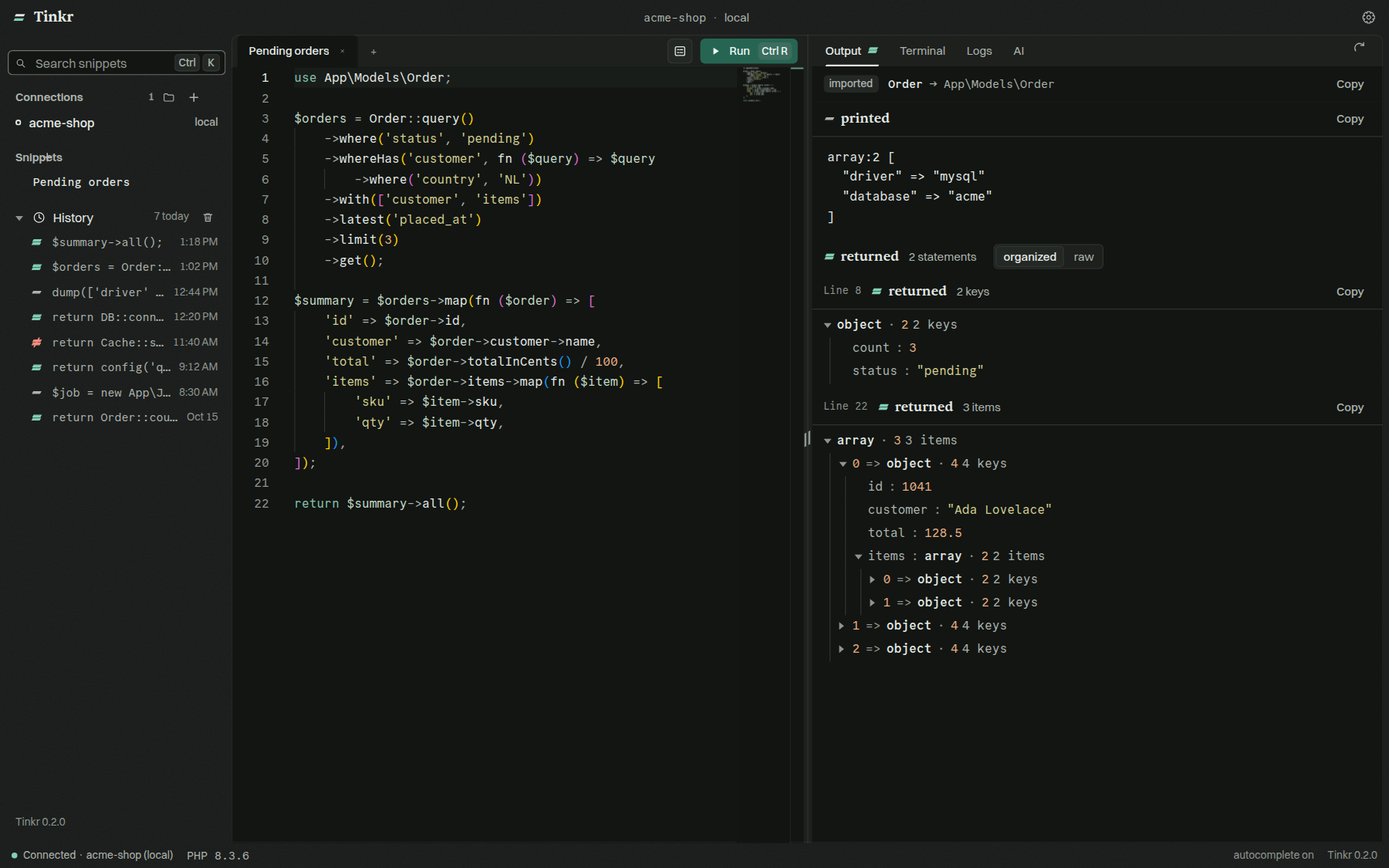
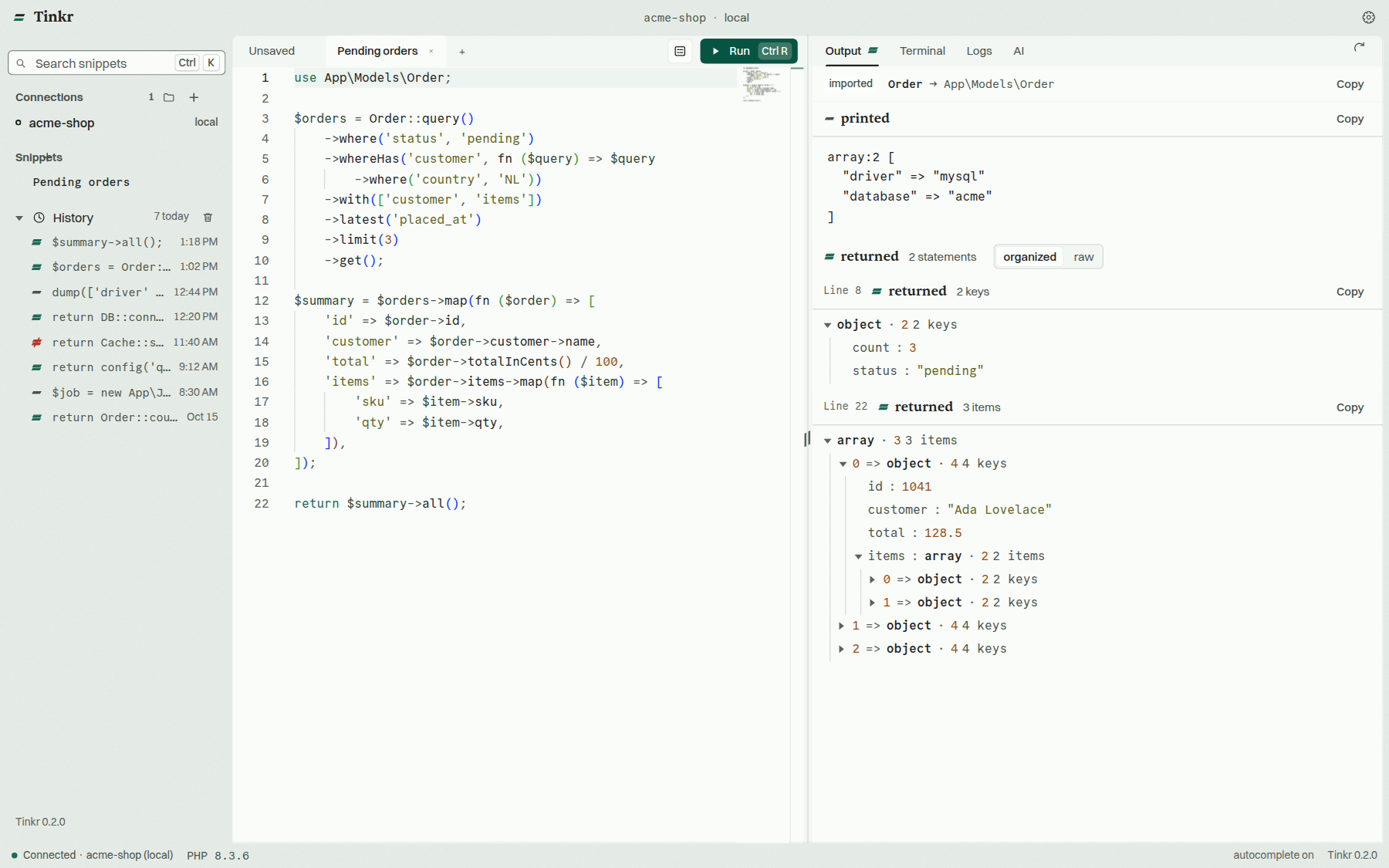
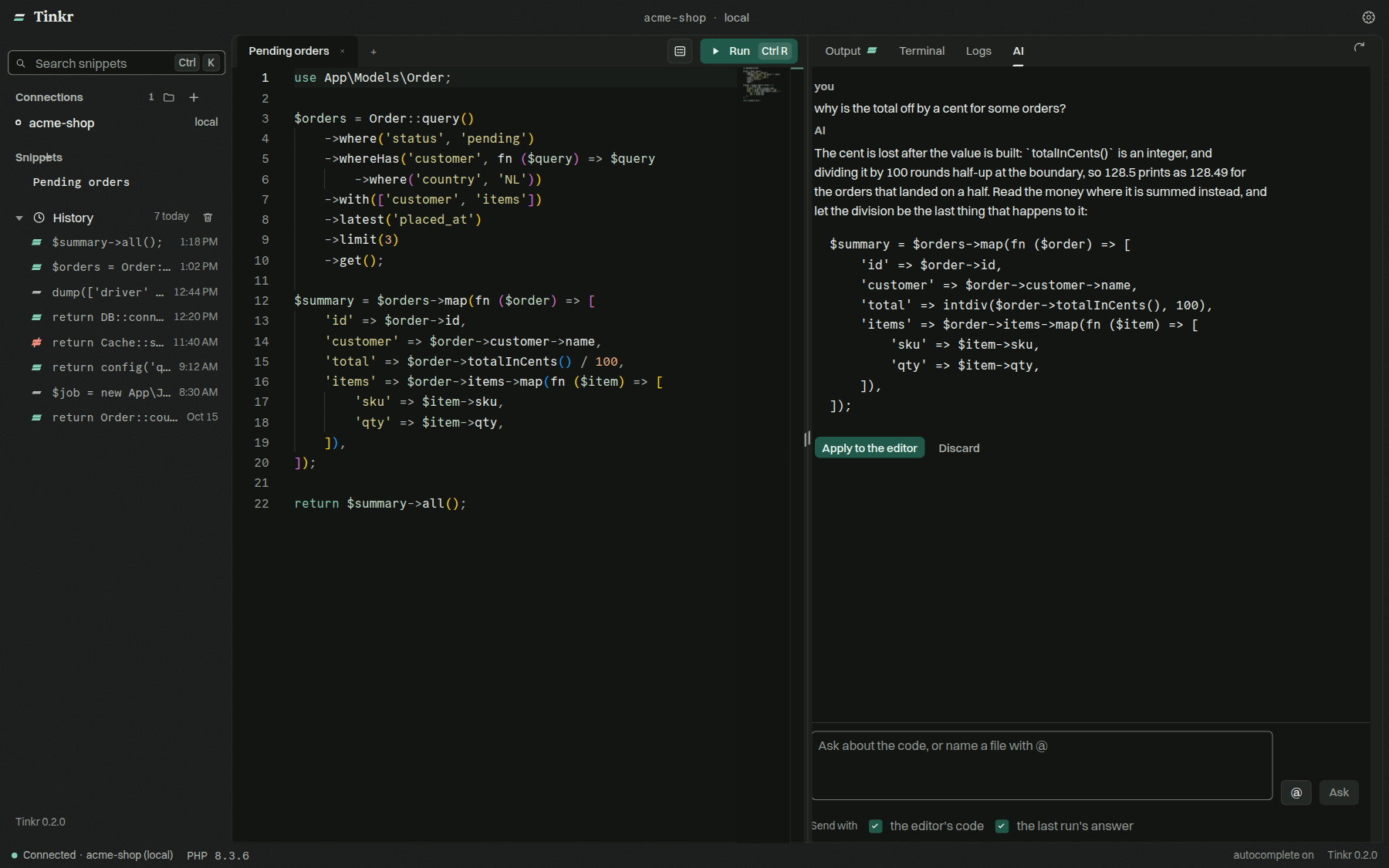
The system is written down in design.md:
the type, the palette, the spacing, the motion, the component voice and the contrast ledger. The two
ITF faces are fetched at build time (the license lets the app embed them but not redistribute them),
and the code's face is OFL and lives in the repository.
macOS: this build is not signed and notarized yet, so macOS reports the app as damaged. Drag Tinkr to Applications, then run this once:
xattr -dr com.apple.quarantine /Applications/Tinkr.app
macOS: this build is not signed and notarized yet, so macOS reports the app as damaged. Drag Tinkr to Applications, then run this once:
xattr -dr com.apple.quarantine /Applications/Tinkr.app
Tinkr 0.1.0-beta.2 — what changed since the first beta.
The window splits either way now: the code on the left with the result on the right, or one above the other, whichever you set in Preferences → General → Layout.
And a run answers for every statement in it, not only the last one, each result carrying the line it came from — so $user = User::find(1); shows the model and $user->name; shows the name under it. Statements, in the same settings page, is every statement or only the last.
Español, Deutsch and Português join English and 中文, and the language is a row in Preferences → General at last — before this it could only be changed by editing the config file and restarting. Every word follows it, the result pane and the status bar included, along with the labels a screen reader is read. Castilian Spanish and Brazilian Portuguese.
file:/// — an empty window waiting for the next load.latest-linux.yml, the file an AppImage reads. That is fixed.feat: the app asks before it updates itself
feat: run and form are icons, with their words in the tooltip
fix: the settings affordance is a cog, not a sun
feat: a bin clears the runs, and every navigation goes through the hash
feat: switching connection switches what belongs to a connection
feat: a run opens in its own tab, and the list stays short
feat: the last english words, and the trap they came with
feat: every word, in the language the app is in
feat: spanish, german and portuguese, and a way to switch
feat: the code beside the result, and a result for every statement
This is a beta and is published as a pre-release: GitHub does not hand it to watchers of this repository's releases, and an installed stable copy is never moved onto it. An installed beta, though, is offered this one by the update panel above — which is the point of it.
Installers are attached below: macOS (arm64), Linux (AppImage, deb, rpm, tar.gz) and Windows (installer and portable).
macOS: this build is not signed and notarized yet, so macOS reports the app as damaged. Drag Tinkr to Applications, then run this once:
xattr -dr com.apple.quarantine /Applications/Tinkr.app
Tinkr 0.1.0-beta.1 — the first release of this app under its own name: a desktop scratchpad for running PHP against a Laravel project, and for reading what came back.
Connect to a project on this machine, in a container or over ssh, write a snippet, and run it against a real tinker session.
php artisan tinker by default), so anything that gets you a tinker prompt works — docker compose exec, a remote shell, your own wrapper.Ctrl K (⌘K).field_-prefixed variables (the prefix is yours to set) and gives you a form to change their values in, so a snippet can be driven without editing it. The tab switches back and forth between the form and the code.Ctrl R to run — the shortcut is yours to set.Aeat finds AeatEnvio rather than Symfony.::, the methods of that class — its own, its traits' and its parents' — with their parameters and return types, resolved by asking the session itself.AeatEnvio::first() needs no use statement, and the run tells you what it imported.dump comes back whole instead of sitting behind less.dump, an echo — is drawn above it, as the session's own words.Installers are attached below for macOS (arm64), Linux (AppImage, deb, rpm, tar.gz) and Windows (installer and portable).
This is a beta and is published as a pre-release: GitHub does not hand it to watchers of this repository's releases, and the app's updater skips pre-releases, so no installed stable copy is moved onto it.
macOS: this build is not signed and notarized yet, so macOS reports the app as damaged. Drag Tinkr to Applications, then run this once:
xattr -dr com.apple.quarantine /Applications/Tinkr.app